One shared queue
Keep called numbers synchronized between a focused controller and a separate, fullscreen-friendly display.


RideReady is being built for school pickup. Typing-to-MIDI turns a laptop keyboard into a controller for virtual instruments.
For schools & community programs
Running a music program means coordinating everything around the lesson, too. RideReady is being built to give staff a clear, synchronized way to call numbers and manage a busy pickup line.
A dedicated controller manages the queue, while a shared display keeps called numbers visible. Less back-and-forth means more attention for the students in front of you.
Try the RideReady walkthroughKeep called numbers synchronized between a focused controller and a separate, fullscreen-friendly display.
Adjust repeated calls or remove a number from the controller as the pickup line moves.
Pair a browser or phone over the local network so staff can work where they are needed.
Flexible grid capacity, optional counts, and light or dark themes help keep the queue clear.
Pilot pricing: $199 per location per year. Founding pilot first year: $99 with self setup or $149 with one guided setup session. A 12-month location plan includes a main and spare host computer; phone controllers and displays do not count as hosts. Renews automatically at $199/year unless canceled. Canceling keeps access through the paid term. Checkout and automated license delivery are not enabled.
Pilot pricing & availability
A first step into music creation should not depend on owning a MIDI keyboard. Typing-to-MIDI turns the QWERTY keyboard on a laptop into a controller for virtual instruments.
Explore a synth, try a chord, or work through an idea wherever you have your laptop and music software. A separate hardware controller is optional.
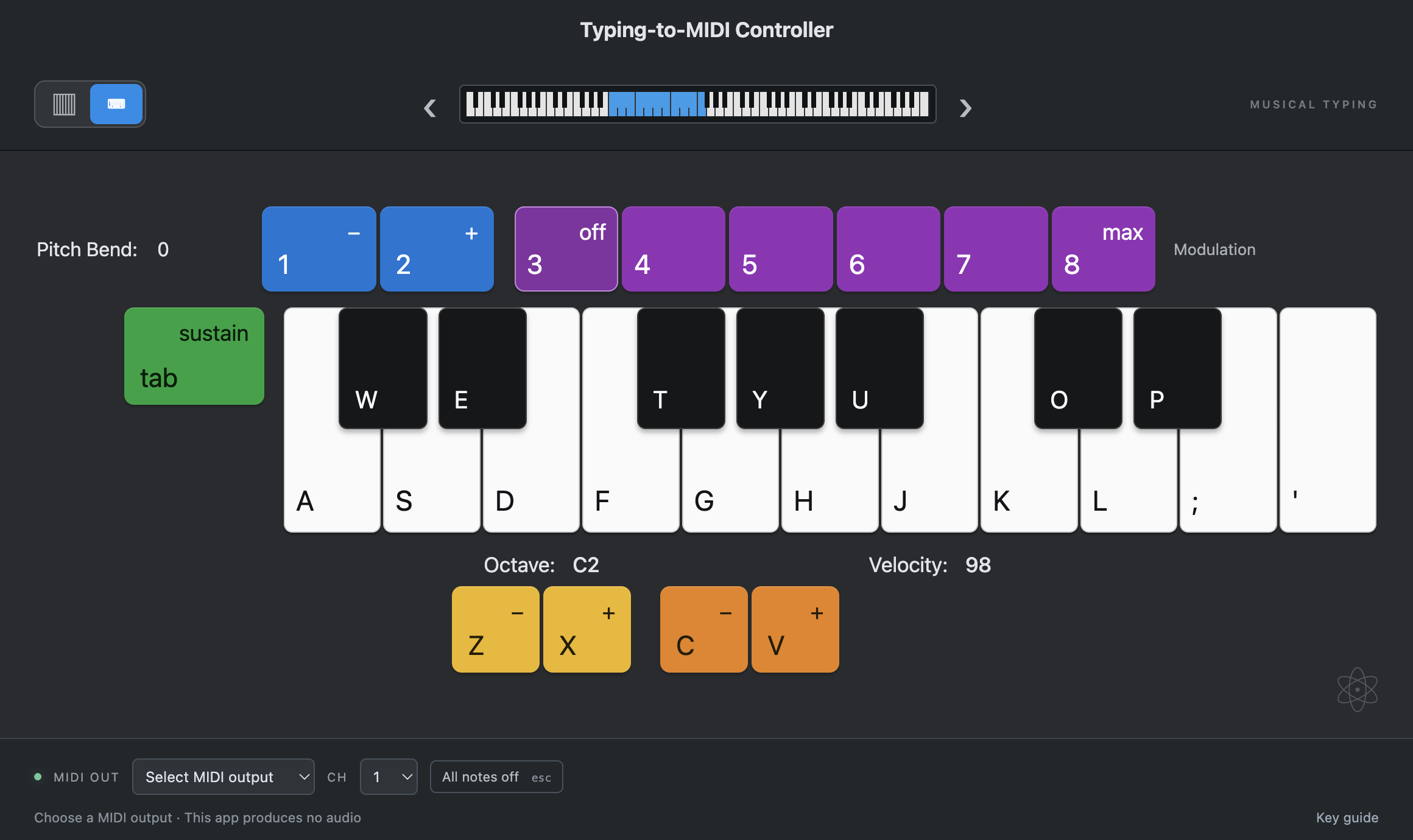
Play notes and chords from your typing keyboard, or click and touch the on-screen keys.
Adjust octave and velocity, hold sustain, and add pitch bend or modulation with keyboard controls.
Choose a MIDI output and channel to send notes to a compatible standalone instrument or music application.
Explore virtual instruments without buying or carrying a separate MIDI keyboard.
Typing-to-MIDI sends MIDI notes; it does not produce audio on its own. You’ll need a MIDI-capable instrument or music app and a physical or virtual MIDI port. Select the same port in both apps to start playing.
Read the setup guideThese early builds may trigger operating-system security prompts. macOS builds are ad-hoc signed and not notarized; Windows builds are unsigned. Apple silicon has been runtime-tested; Intel Mac and Windows builds have not.
Typing-to-MIDI is available now. RideReady is in development.